Custom cursor themes for macOS Sequoia and TahoeControl your
cursor.
Browse 77 themes, preview their styles, and apply one from the menu bar. Macape registers supported cursors with macOS so the system draws them.





Hover a tile to try that cursor role in your browser. The illustrations preview the selected theme; your browser does not apply a Macape theme.
The current download includes 77 themes.
Everything you need.
A native menu bar app that talks to the macOS cursor system directly. Pure Swift and AppKit.
77 Cursor Themes
Bibata, BreezeX, Catppuccin, Google Dot, Fuchsia, XCursor Pro, Nordzy, Phinger and more: 26 families. Pick a theme to download and apply it.




System Cursor Engine
Macape registers supported cursor images with the macOS cursor service. The system draws them in apps that use system cursors, without a continuously moving overlay in normal operation.
Cursor Scaling
Adjust cursor size from 75% to 150% with a slider or the 75 / 100 / 125 / 150 presets. Applied live.
Menu Bar App
Click the menu bar icon for the theme list and the gear for settings. Macape stays out of the Dock.
Handedness Filtering
Filter by All, Universal, Right or Left. Dedicated left and right variants across Bibata, Nordzy and Phinger.
Total Glass Mode
Blurred, translucent app windows with adjustable opacity from 30% to 100%.
Fullscreen Support
Keep the themed cursor in fullscreen apps and games, or switch back to the system cursor there. One toggle.
Animated Cursors
Busy and wait cursors animate as real frame strips, played by the system. Animated themes are marked in the list.
77 themes. 26 families.
From Material Design to anime cursors. Macape downloads XCursor theme archives from their authors' GitHub repositories.
Bibata
20Modern, Original, Ice, Amber, Classic, Rainbow, Zebra, Bee, Extra; right-handed variants
Catppuccin
8Latte, Frappe, Macchiato, Mocha; Blue and Dark
Banana
4Original, Blue, Green, Red
BreezeX
4Original, Black, Dark, Light
Fuchsia
4Original, Amber, Pop, Red
Google Dot
4Black, Blue, Red, White
Nordzy
4Default, White; left-handed variants
Notwaita
4Original, Black, Gray, White
Phinger
4Light, Dark; left-handed variants
XCursor Pro
3Dark, Light, Red
Anime
2Cirno, Reimu
Apple Cursor
2Default, White
Adwaita
Adwaita Cursors
Dracula
Dracula Cursors
Graphite
Graphite Cursors
Layan
Layan Cursors
Lilith
Lilith
Lyra
Lyra Cursors
McMojave
McMojave Cursors
NieR
NieR Cursors
Numix
Numix Cursor
Oxygen
Oxygen Cursors
Pokemon
Pokemon
Qogir
Qogir Cursors
Radioactive
Radioactive
Vimix
Vimix Cursors
Themes by Abdulkaiz Khatri, Catppuccin, Guillaume Boehm, vinceliuice, phisch, ashuramaruzxc and others. Thank you.
Built for Sequoia and Tahoe.
Macape normally registers theme cursors with the macOS cursor service. The system then draws them in apps that use system cursors.
System Registration
Each cursor of the theme is registered under the system identifier macOS uses for it. WindowServer draws the result on every display, in every app that uses system cursors.
XCursor Parser
A custom parser reads freedesktop.org XCursor files, keeps only the sizes macOS needs and composes animated cursors into frame strips. Validated before anything is applied.
Every Cursor Type
Arrow, text, hand, resize, busy, crosshair and the rest of the system cursor set are mapped to the theme. Types a theme lacks can fall back to the macOS cursor.
Snapshot and Restore
The original macOS cursors are saved before the first change. Reset brings them back instantly, and so does quitting with restore enabled.
What it can't do.
Macape changes the system cursors. A few apps bring their own pointer images and ignore the system set.
Apps with built-in cursors
Terminal, Chromium-based browsers and Remote Desktop clients draw their own pointers. They keep them.
Exclusions
Add any app to the exclusion list and Macape leaves it alone. Remote Desktop is excluded by default.
Screen sharing
Remote viewers can see the real system cursor while you share your screen. One toggle in settings.
Full control.
Everything in one settings window. Every option persists automatically.
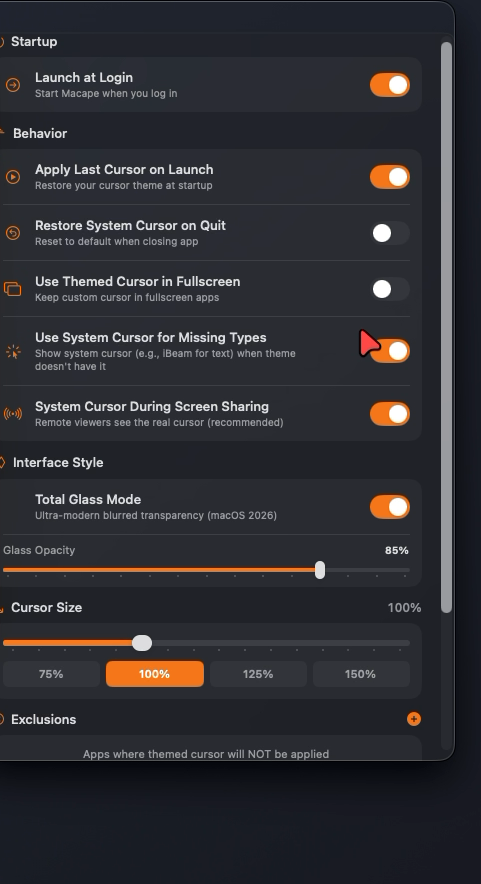
Launch at Login
Start Macape when you log in.
Apply Last Cursor on Launch
Restore your cursor theme at startup.
Restore System Cursor on Quit
Reset to the default cursors when closing the app.
Use Themed Cursor in Fullscreen
Keep the custom cursor in fullscreen apps.
Use System Cursor for Missing Types
Show the macOS cursor, such as the text iBeam, when a theme doesn’t include it.
System Cursor During Screen Sharing
Remote viewers see the real cursor. Recommended.
Total Glass Mode
Blurred transparency for the app windows, opacity from 30% to 100%.
Cursor Size: 75% to 150%
Slider plus 75 / 100 / 125 / 150 presets, applied live.
App Exclusions
Apps where the themed cursor is not applied. Editable list.
Reset Application
Remove downloaded themes and settings and restore the system cursors.
Privacy First
Zero data collection. No analytics, no telemetry, no phone-home. Works completely offline after initial theme downloads.
- No data collection
- Settings stay on your Mac
- Themes come from their authors' GitHub repositories
- No account or sign-in required
Native Performance
Pure Swift and AppKit. No Electron, no web wrappers. Universal app for Apple Silicon and Intel.
- macOS draws registered cursor images
- Universal app: Apple Silicon and Intel
- No continuous cursor overlay in normal operation
- Animated themes supported
Reliable & Safe
Your original cursors are saved before the first change and can be brought back at any moment.
- Snapshot of the original cursors
- Reset at any time, one click
- Restore on quit
- Theme archives checked before application
Get started.
Download Macape, move it to Applications, then choose a cursor theme.
Requirements
Installation
Apple's guide to opening apps from unidentified developers ↗
Free, about 2 MB, zero telemetry, no account
Signed with Apple Developer ID, notarized by Apple. No tracking or sign-in.
Questions.
Short answers about compatibility, permissions and getting the default cursor back.
Does Macape work on macOS Sequoia and Tahoe?
Yes. Macape requires macOS 15 Sequoia or later and is tested on Sequoia and macOS 26 Tahoe. It is a universal app for Apple Silicon and Intel Macs.
How does Macape change the cursor?
Macape converts the selected XCursor theme and registers each cursor with the macOS cursor service under the identifier macOS uses for that cursor type. WindowServer then draws the themed cursors itself, in every app that uses system cursors. In normal operation there is no overlay window following the pointer.
Is Macape a Mousecape alternative?
Yes. Macape uses the same kind of system cursor registration as Mousecape, but ships a built-in catalog of 77 ready-made themes, a menu bar picker and cursor scaling, and is tested on macOS 15 Sequoia and macOS 26 Tahoe.
Macape vs Mousecape →What permissions does Macape need?
None of the privacy permissions: Macape does not ask for Accessibility, Screen Recording or Input Monitoring. It needs an internet connection only to download a theme archive from its author's GitHub repository the first time you pick it.
How much CPU and memory does it use?
About 0% CPU when idle and about 60 MB of memory. Animated busy and wait cursors are registered as frame strips that macOS plays itself, so animation does not keep the app busy.
How do I go back to the default macOS cursor?
Click Reset in the Macape menu bar popover. Macape saves the original macOS cursors before the first change and restores them. You can also turn on Restore System Cursor on Quit, or use Reset Application in Settings to remove downloaded themes and settings and restore the system cursors.
Why do some apps keep their own cursor?
Terminal, Chromium-based browsers and Remote Desktop clients draw their own pointer images instead of the system cursors, so a system theme does not change them.
Is Macape free?
Yes. The download is free, about 2 MB, with no account, no telemetry and no in-app purchases. The app is signed with Apple Developer ID and notarized by Apple.